


Dash Cam: Dashcam Viewer
4.287.00 Reviews
App Specs
- Version
- 1.1.1
- Updated On
- License
- Free
- Downloads
- 100,000+
- Developer
- Driving Theory Test LLC
- Categories
- Auto & Vehicles
- Platform
- Android
Screenshots
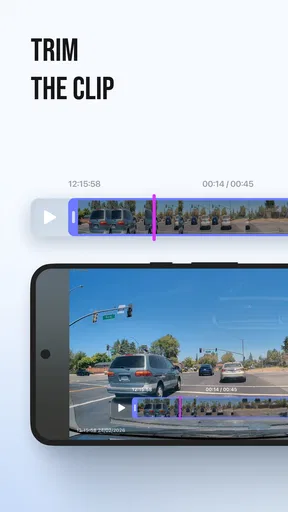
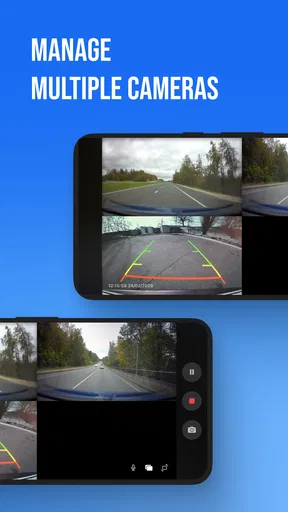
 Analysis by AppCompare
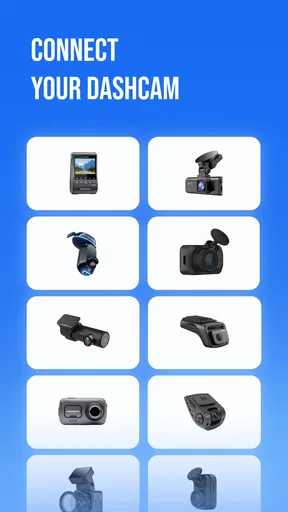
When a dash-cam clip matters, finding it quickly can be more useful than having another place to watch videos. Dash Cam: Dashcam Viewer is aimed at that practical moment: viewing and downloading footage from compatible cameras, with support named for brands including Redtiger, Viofo, and Rexing. I see its appeal less as a general video app and more as a companion for getting a recording from the camera to a phone when you need to inspect or keep it.
That focus gives the app a clear job, but it also makes compatibility the first thing I would check before building it into my routine. A dash cam’s connection method and file-handling options can shape the experience as much as the viewer itself. If your camera is supported and you want a straightforward way to review clips, this Android app may fit. If you expect a full driving-safety suite, automatic evidence management, or broad editing tools, you should look elsewhere.
From camera footage to a clip you can use
I find it helpful to think of this app as one link in a longer chain: a camera records an event, the phone lets me check and save it, and a separate step may be needed to preserve or share it. That perspective keeps a quick preview from being mistaken for a complete archive. Before relying on the handoff, I would test the whole route with an ordinary clip.
Start with the camera you already own
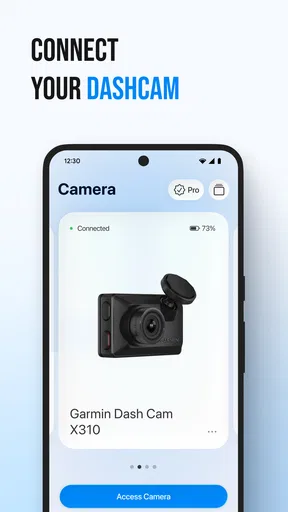
The most sensible starting point is not the app’s rating or its feature list; it is the model of dash cam installed in your vehicle. The developer, Driving Theory Test LLC, presents this as a viewer for footage from several camera brands. That makes it potentially useful if you are trying to avoid moving a memory card to a computer just to check a recording, but brand support alone does not guarantee that every model or setup will behave the same way.
Before relying on it, I would check the camera’s own instructions for how it shares recordings and then confirm that the exact model is supported. This small bit of preparation can prevent a frustrating first attempt in a car park or at the roadside. It is also worth trying an ordinary, unimportant clip first. That lets you learn the connection and download steps before you are dealing with a recording you urgently need.
The app sits in the auto-and-vehicles space, but it is not a driving route planner or a vehicle-maintenance tracker. Its purpose is narrower: give you a way to watch and save dash-cam footage. I like that clarity. A focused viewer can be more convenient than opening a computer workflow for every short clip, provided the camera and phone cooperate.
Reviewing a recording on the phone
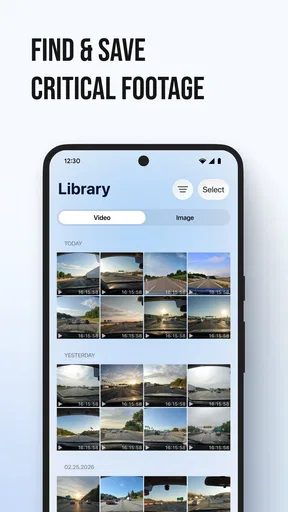
In an everyday situation, imagine hearing a sudden horn or noticing a close pass on your commute. Once parked safely, you want to check whether the camera caught the moment rather than replaying a long journey from memory. The useful workflow is to connect through the method your camera supports, locate the relevant recording, play it, and decide whether it is worth keeping on the phone.
Worth Reading Before You Choose

Flipboard Shows What News Apps Must Do Beyond the Feed

Switching to Android Auto Means Rethinking Your Driving Routine

Google Calendar Makes a Crowded Week Easier to Manage

Ludo King Makes the Most of the Minutes Between Plans

Baby Panda World Brings Quick Play to Modern Phones, but Its Game Library Feels Busy

ESPN’s Live Game View Makes Following Close Games Easier
That sequence sounds simple, but dash-cam footage can be less tidy than a normal phone video. A camera may divide a journey into separate files, and the moment you want could sit near the end of one clip or the beginning of the next. My practical tip is to note an approximate time and look at the recordings around it, rather than assuming the event will appear in a single obvious file. A quick preview can help you avoid downloading several large clips unnecessarily.
Downloading is most valuable when it changes what you can do next. A saved copy is easier to show to another person than footage that remains only on the camera, and it can be more convenient to review away from the vehicle. Still, I would treat the phone copy as a working copy, not as proof that the original has been safely preserved. If the recording may matter later, keep the camera’s original file intact until you have checked that the saved version plays correctly.
The handoff from car to phone—and beyond
This app’s key handoff is from a dash cam to a mobile screen. That can save time compared with removing a memory card and finding a reader, particularly when all you need is a quick look. It can also make it easier to decide whether a clip deserves a more careful review on a larger screen.
There is a second handoff to think about: from your phone to whoever needs to see the recording. A clip that plays in the viewer is not automatically organized, backed up, or ready to share in every format. I would first confirm that the downloaded file is complete and plays outside the immediate viewing step before sending or storing it elsewhere. For an insurance conversation, a safety report, or a personal record, retaining the original and noting the date and approximate time can also make the footage easier to interpret later.
This is where expectations matter. The app is useful as a viewing and downloading stage in a larger process; I would not assume it replaces a dedicated backup routine, evidence-management system, or desktop review. If a recording is important, move it into a storage location you trust and keep a second copy when appropriate. That extra step is not glamorous, but it is a better safeguard than trusting a single phone download.
What it does well in a real routine
The strongest case for this app is a driver who checks footage occasionally and wants to do so without turning every review into a computer task. For example, after a minor parking scrape, you may want to inspect the camera’s view while still near the car. Or you might review a surprising road interaction later that day, save the relevant segment, and share it with someone who can help assess what happened.
In those situations, the phone is a natural first screen. It lets you verify whether the camera captured anything useful before spending time exporting a collection of files. The named support for Redtiger, Viofo, Rexing, and other cameras also makes the app more targeted than a generic gallery player: it is intended to fit into the dash-cam workflow rather than merely play any video you happen to have.
Its audience is therefore fairly specific. I would consider it if I already own a compatible dash cam, want occasional access to recordings, and value checking footage on the device I carry. It is less compelling if you never review your recordings, if your camera already gives you a smooth phone experience, or if you need automated sorting and long-term evidence handling.
How it compares with the usual alternatives
The common alternatives are a camera manufacturer’s own companion app, a computer with a memory-card reader, or simply leaving the footage on the camera until there is a reason to retrieve it. A manufacturer’s app may be the better choice when it is designed for your exact model and offers a dependable connection. A computer can be better for reviewing long recordings, comparing several files, or copying material into a carefully organized archive.
Compared with those options, Dash Cam: Dashcam Viewer is most attractive as a phone-based middle ground. It can spare you the card-removal step for a quick inspection, while remaining more focused than a general file manager. The trade-off is that a phone workflow depends on the compatibility and transfer experience of the camera you own. If that connection is awkward, using a card reader may be less elegant but more predictable.
I would not choose a viewer solely because it lists familiar camera brands. Check the exact camera model and test a routine clip before an urgent situation arises. That recommendation is especially important for drivers who rely on footage for work or who regularly need to pass recordings to someone else. Convenience is only a benefit when the handoff works consistently enough for your particular setup.
Cost, maturity, and practical expectations
The app is free to install, with in-app purchases listed from $1.99 to $59.99 per item. Since those purchases can vary substantially, I would inspect what an individual purchase covers before paying and decide whether it solves a real limitation in your own workflow. If you only need occasional viewing, start by checking whether the free experience handles your camera and the basic task you have in mind.
It has a 4.2 average from around 7,700 ratings, and it has passed 100,000 installs. Those figures suggest that drivers are finding it, but they do not tell me whether it will work with a particular camera model. The app is rated for everyone, and version 1.1.1 is the current release. It was released on May 7, 2026, so I would still approach it as a relatively early product rather than assume every edge case has been polished away.
One useful habit is to test the whole chain, not just whether the app opens: connect the camera, find a known clip, play it, download it, and then check the downloaded file. Doing this once when nothing is at stake reveals where your own setup may slow you down. It also tells you whether the phone is a suitable place for the footage or whether you should plan to transfer important recordings to a computer.
Where the workflow can break
The main friction is the dependency on camera compatibility. A supported brand can include devices with different ways of connecting or organizing footage, so the experience may not be uniform across every camera. If you cannot locate recordings or the connection does not behave as expected, the app may not be the weak link; the camera’s setup could be the deciding factor. That is why checking the model and testing beforehand are more useful than assuming a smooth first try.
Another limitation is the difference between viewing and managing evidence. Watching a clip does not necessarily make it easy to identify the right moment in a long drive, preserve context, or keep an organized record. If you regularly handle incidents, consider a more deliberate process: note when the event occurred, retain the original recording, verify any downloaded copy, and move important footage to secure storage. This app can serve one step in that process, but it should not be the entire process.
Phone review is also not always the best way to judge detail. A small screen is convenient at the roadside, yet a larger display can make it easier to examine distant signs or compare frames. For a quick yes-or-no check, the phone is likely enough; for careful review, a computer may be the wiser next stop. The best workflow is not necessarily the one with the fewest steps, but the one that preserves the recording and lets you inspect it clearly.
Who should give it a try
Dash Cam: Dashcam Viewer makes the most sense for someone who wants a practical bridge between a compatible dash cam and a phone. I would install it, test a routine recording, and keep it available if that test is smooth. Drivers who rarely retrieve footage may not get much value from adding another app, while people who need a dependable archive or detailed analysis should pair phone viewing with a stronger storage and review process.
Driving Theory Test LLC has chosen a useful, focused problem to solve: getting dash-cam recordings onto a screen you already use. The app’s value depends less on its broad appeal than on how well it fits your specific camera and the next step you need to take with a clip. If you confirm compatibility and treat downloads as part of a careful handoff—not as automatic long-term backup—it can be a handy tool. If your camera’s own app already handles that job reliably, or if you need more serious file management, sticking with that option or moving to a computer is the more sensible choice.
Pros
- Browse recorded clips in an organized viewer instead of searching through folders.
- Useful for checking footage after an incident or during a routine review.
- Playback makes it easier to inspect details captured by your dashcam.
- Can help you locate relevant recordings more quickly.
- A practical companion for drivers who regularly save dashcam footage.
Cons
- Its usefulness depends on having compatible dashcam recordings available.
- Supported video formats may vary between dashcam models.
- Large recordings can take up considerable storage space.
- Reviewing footage on a phone may be less comfortable than on a larger screen.
- Video playback and file handling may be affected by your device's performance.
FAQs for Dash Cam: Dashcam Viewer
What does Dash Cam: Dashcam Viewer do?
Dash Cam: Dashcam Viewer is designed to help you browse and review video recordings captured by a dash camera on your mobile device. Depending on the app version and the camera or file format, you may be able to view clips, find recordings, and manage or share footage. It is primarily a companion for reviewing existing dashcam videos, rather than a guarantee that every phone can record or control every dash camera.
Can I use Dash Cam: Dashcam Viewer with any dash camera?
Compatibility depends on how your dash camera stores or transfers its footage and which video formats the app supports. Some cameras use a memory card that you need to connect to your phone with a suitable adapter; others transfer clips over Wi-Fi or through a manufacturer-specific system. Check the app listing and your camera’s instructions before downloading, and test a short recording to confirm that it plays correctly.
Does the app let me watch dashcam footage live or only review saved videos?
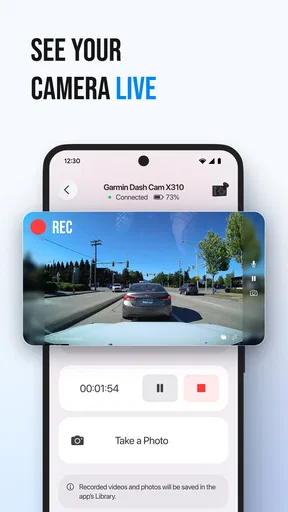
The app’s main purpose is viewing dashcam recordings, but live viewing and camera-control features can vary by app version and by the connected camera. A dashcam may need to provide its own Wi-Fi connection or supported streaming function for live playback to work. If you only need to inspect saved clips, confirm that your videos can be imported or accessed on your phone; do not assume live streaming is available.
Is Dash Cam: Dashcam Viewer free, and are there in-app purchases?
Whether the app is free to download, contains advertising, or offers paid upgrades can change over time and may differ between Android and iOS. Review the current store listing for the price, subscriptions, and in-app purchase details before installing. Also consider any extra costs required to access your recordings, such as a card reader, storage space, or a camera connection accessory.
Is it safe to use the app, and what should I check before sharing footage?
Install the app from an official app store and review its current privacy information and requested permissions, especially access to photos, videos, files, or network connections. Dashcam clips can reveal faces, license plates, locations, and travel routines, so think carefully before uploading or sharing them. Keep important recordings backed up, and check local rules before using footage as evidence or publishing it online.


